SnapTube v7.50.1 is a comprehensive multimedia downloader tool designed for Android devices. Its primary function is to bypass the restriction of offline viewing on major streaming platforms. Unlike standard downloaders, SnapTube integrates a full web browser with a media detection engine, allowing users to download video and audio from over 50+ sites (including YouTube, Facebook, Instagram, and TikTok) directly to their device storage.
Key Features of SnapTube
🎥 Multi-Resolution Video Downloading
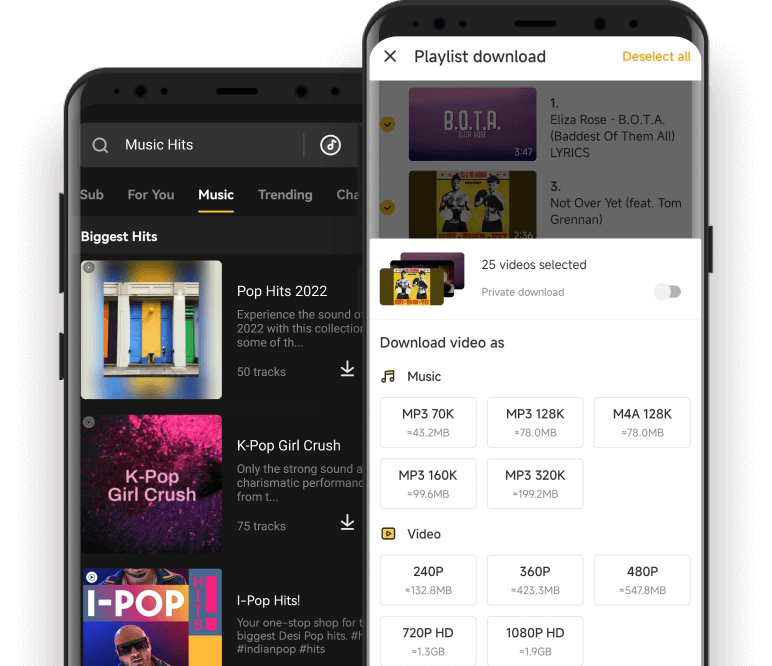
Resolution Choice: Users can select specific quality levels to save data or maximize quality. Options range from lightweight 144p and 240p up to 1080p HD, 2K, and 4K (depending on the source video).
60FPS Support: Capable of maintaining high frame rates for gaming videos and smooth playback.
🎵 Direct Audio Conversion
Video to MP3: Extract audio tracks directly from videos without needing a secondary converter tool.
Formats: Supports downloading in MP3 (various bitrates like 128kbps, 160kbps, 320kbps) and M4A.
🌐 Cross-Platform Support
Integrated Browser: Browse supported sites directly within the app. A download button automatically appears when media is detected on the page.
Supported Sites: YouTube, Facebook, Instagram, TikTok (often removing watermarks), WhatsApp Status, Vimeo, DailyMotion, and many others.
⚙️ Advanced Tools
Batch Downloading: Queue multiple videos or entire playlists to download simultaneously in the background.
Floating Player: Watch videos in a moveable picture-in-picture (PiP) window while using other apps.
Dark Mode (Night Mode): Built-in dark theme to reduce eye strain and save battery on OLED screens.
File Manager: A dedicated "My Files" tab to manage, play, share, or delete downloaded content without leaving the app.
🚀 Performance (v7.50.x Specifics)
Optimized Download Engine: This version includes tweaks to connection stability, reducing "Download Failed" errors on slower networks.
Ad-Block Integration (Internal): While the app itself is ad-supported, its internal browser often blocks popup ads from third-party websites to streamline the download process.
3. User Interface & Experience
Clean Layout: The interface is divided into "Home" (feeds and popular sites), "My Files" (downloads), and "Me" (settings).
Search Bar: A universal search bar allows you to paste URLs or type keywords to search YouTube and other platforms simultaneously.
No Root Required: Unlike some legacy downloaders, SnapTube functions fully on standard Android devices without root access.
4. Pros & Cons
Pros
Cons
Versatile: One app for social media and video sites.
Ads: The free version contains in-app advertisements.
High Quality: Real 4K and 2K download support.
Not on Play Store: Must be sideloaded (APK) due to Google policies.
Offline Playback: Built-in player handles most formats.
Resource Heavy: Can consume significant battery during batch downloads.
MP3 Extraction: Fast conversion for music lovers.
5. Important Safety Note
Because SnapTube downloads videos from YouTube (which violates Google's Terms of Service), it is not available on the Google Play Store. Users must install it via APK.
Advice: Always ensure you are using the official version (like v7.50.1) from a trusted source to avoid modified clones that may contain malware.
Permissions: The app requires storage permissions to save files; newer Android versions may ask for specific folder access.
Screenshots
SnapTube System Requirements
Below are the minimum system requirements for running the SnapTube
Processor:
Intel Pentium 4 or later.
RAM:
2 GB available memory.
OS:
Android 5+.
Space:
100 MB available space.
SnapTube Changelog
Below is the list of changes made to the current version of SnapTube.
Official site does not provide any info. about changes in this version.
SnapTube Details
Below are the details about SnapTube.
App Size:
45.3 MB
Setup Status:
Mod
How to install
Uninstall any previous versions of the application (clear data if you have to)